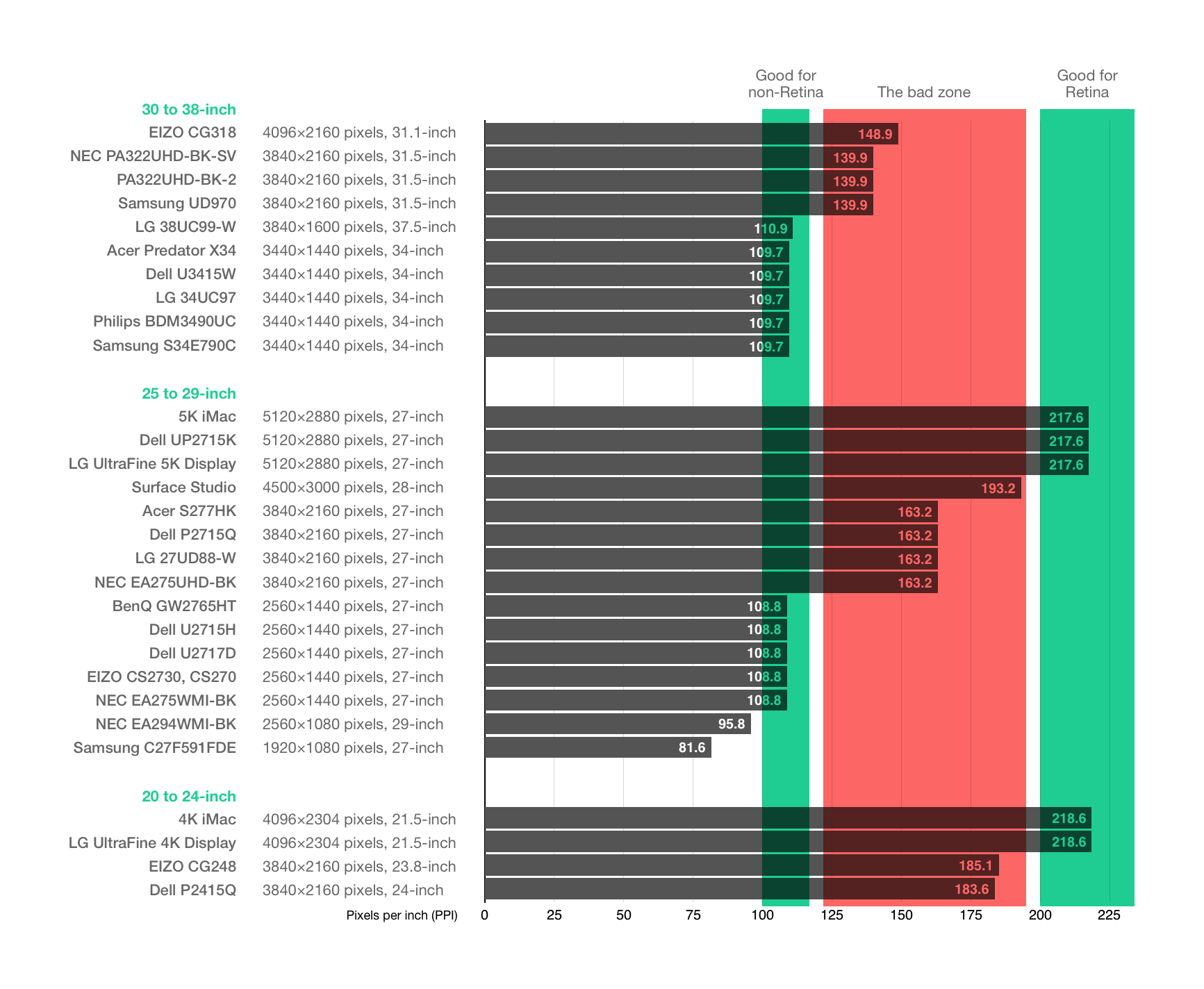
It doesn't help the way that Apple is using "internal" resolution and scaling versus how Windows does it. If you aren't within the density of "retina" display [1.] then there's solid chance the image you're looking at will be blurry. Even though you might have high quality display (whatever the size and resolution are) if you don't play by the rules Apple had imagined you're in tough spot.
I normally use 1440p Retina mode on a 2160p display (internally rendered at 5120x2880, scaled to 3840x2160) on my 2013 Mac Pro running Sequoia, and almost everything looks great.
Caveats:
1. Non-Retina aware VM hosts, remote control clients, and emulators that try to render anywhere near the native resolution look bad, as there's no way to render individual pixels. Retina-aware remote control clients like Microsoft Remote Desktop look great, as do emulators running low resolutions like VGA.
2. Images can't be displayed pixel-perfectly, which is rarely a problem when viewing or editing photos, and obviously not a problem when viewing or editing vector artwork, but can be an issue when viewing or editing native resolution screenshots and other non-photographic images, as shown in the article (but see the first "nice benefit" below).
3. X11 applications displayed in Xquartz don't look great.
4. Video decoding and processing is considerably more resource intensive, as video, like everything else, is rendered at the full internal resolution. On my system (12-core 2013 Mac Pro with D300 GPUs), the only practical problem I've had, aside from relatively high CPU/GPU utilization, is frame drops when playing back 60 FPS video in MPV with some of the higher-quality GPU scaling and postprocessing algorithms enabled.
Nice benefits of the implementation:
1. Screenshots are saved at the full internal resolution, so they look accurate when opened in an image viewer, and even better when viewed on a display that supports the full internal resolution.
2. You can zoom in to see the full internal resolution in real time using the OS's Accessibility Zoom feature.
Final note: I've rarely had problems more serious than window rearrangement when switching between 2160p60 native, 1440p60 Retina, 1080p60 Retina, and 1080p120 native, so switching resolutions in the rare cases where I need a native or integer scaled resolution is only a minor inconvenience (e.g., I occasionally run Mac OS 9 under QEMU for fun or to copy data from an older Mac filesystem that current OS versions don't support; incidentally, I seem to recall QEMU is one of the few examples I've found of Mac software that has trouble with resolution changing at runtime).
My screen is 4k and it looks as sharp as it gets with the 1080p scaling. As far as I understand it only gets blurry when using the 1440p setting as that changes the render resolution to 5k which doesn't scale cleanly to a 4k screen.
Which means the UI & text is a bit larger than usual but it's the right size for me.
You're correct but also Apple had to choose some sort of sweet spot. They chose one that's high ppi (~240) which means that regular monitors will not do but Apple wanted to make sure they were satisfying pro users who in fact do need that high of a ppi.